Jun 4, 2017 | Blog

How to Set AllowOverride All on Ubuntu for WordPress Permalink to Work

WordPress permalink does not work as per default Apache settings of certain Operating Systems. For example, if we need to host WordPress on Apache2 running on the Ubuntu server, we need to modify the Allow Override rule to make the permalink changes work. In another case, WordPress will show a 404 error page if we set up a permalink.

To Allow Override rule in Apache2 and use pretty URLs for WordPress installs on Ubuntu Server or other Operating Systems, a small modification to apache2.conf file is required.

Here is the path of the file and setting that need to be updated to overwrite URL rewrite rule in Ubuntu 16, 17 and further.

Open this file in edit mode: /etc/apache2/apache2.conf

You could use nano editor. The command could go something like this.

cd /etc/apache2/

sudo nano apache2.conf

Then the editor pops the file up.
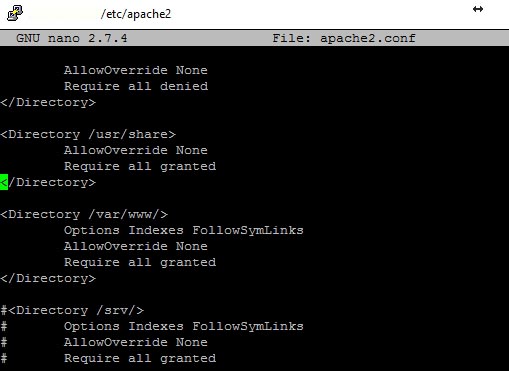
Look for the following like and make some changes as shown below.
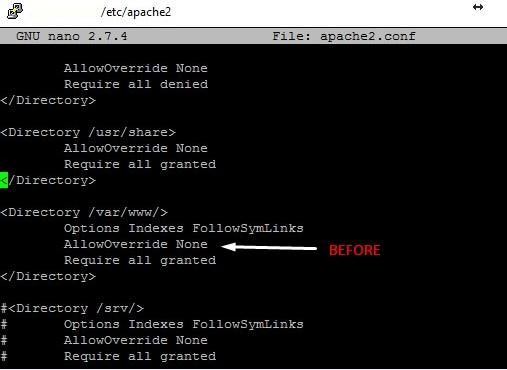
Change AllowOverride None to Allow Override All.
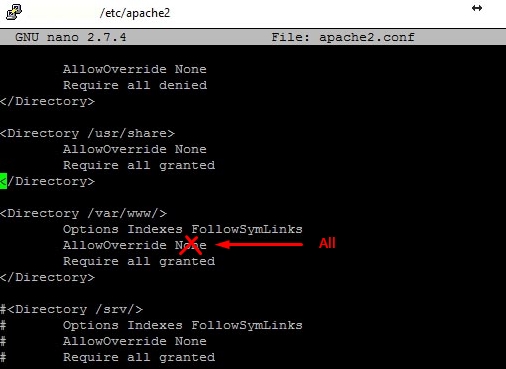
In next step, restart apache and things will be good to go

sudo systemctl restart apache2

Now WordPress Permalink will work. In case if the permalinks still does not work, mod re-write could be enabled using the following command.

And finally restart apache server
sudo systemctl restart apache2

Subscribe and Never Miss Out!

Posted By:
Shoeb
Hi, I'm Shoeb. I've been fortunate to work with WordPress for over a decade and I'm continuously learning from this journey. Alongside some wonderful people, I help run Elicus in Jaipur. Our aim is to make WordPress tools that are simple and helpful.

5 Comments

  1. hoover

    Thanks for this tip, it fixed my “permalinks break new editor” bug i’ve been chasing for weeks! 🙂 (“Invalid JSON response”, which is a very helpful error message)

    Reply
  2. Marshall

    503 is a temperory error. Are you still not able to access the site even after a few reload attemps? Try considering restarting the server.

    Reply
  3. Anónimo

    HTTP ERROR 503 after the changes.
    Why?

    Reply
  4. Joe Stroup

    I have a couple of WordPress sites running on Ubuntu 18.04 – and my permalinks seem to work fine without this modification.

    Perhaps there’s a problem in some instance I’m not testing. Or perhaps this newer release of Ubuntu no longer has the problem.

    Can you shed any light on the matter?

    Reply
    • Marshall

      Hi Joe,

      Is your server a custom built or you used any installer that might have taken care of the AllowOverride setting?

      I have not yet tested this on a custom built Ubuntu 18.x server and would love to give this a try and see if this works.

      Reply

Submit a Comment

Your email address will not be published. Required fields are marked *

This site uses Akismet to reduce spam. Learn how your comment data is processed.

5 Comments

  1. hoover

    Thanks for this tip, it fixed my “permalinks break new editor” bug i’ve been chasing for weeks! 🙂 (“Invalid JSON response”, which is a very helpful error message)

    Reply
  2. Marshall

    503 is a temperory error. Are you still not able to access the site even after a few reload attemps? Try considering restarting the server.

    Reply
  3. Anónimo

    HTTP ERROR 503 after the changes.
    Why?

    Reply
  4. Joe Stroup

    I have a couple of WordPress sites running on Ubuntu 18.04 – and my permalinks seem to work fine without this modification.

    Perhaps there’s a problem in some instance I’m not testing. Or perhaps this newer release of Ubuntu no longer has the problem.

    Can you shed any light on the matter?

    Reply
    • Marshall

      Hi Joe,

      Is your server a custom built or you used any installer that might have taken care of the AllowOverride setting?

      I have not yet tested this on a custom built Ubuntu 18.x server and would love to give this a try and see if this works.

      Reply

Submit a Comment

Your email address will not be published. Required fields are marked *

This site uses Akismet to reduce spam. Learn how your comment data is processed.

Progress Bars in Divi: Layouts, Usage, and How to Add Them

Progress Bars in Divi: Layouts, Usage, and How to Add Them

A website is all about capturing the visitor’s attention, offering them a solution or information they are looking for in the most convenient way. Without a user-friendly design, it’s not possible. Hence, you need to add interactive elements that make exploring the...

Divi 5 Official Release Date and Things to Keep in Mind

Divi 5 Official Release Date and Things to Keep in Mind

The time to say goodbye to the longest-running version of the Divi theme is about to come. In a few weeks, Divi 4 will be succeeded by its newer version, Divi 5, and the official release date has already announced. For those who are on the Divi 4 version, it’s...

Divi WooCommerce Extended

Subscribe and Never Miss Out!