
This guide is for agencies and freelancers who built a post template in the Divi Theme Builder and keep taking the same call: a client went in to edit one blog post, and now every post on the site shows the same content. You will see the three things that actually cause it, the settings that stop it happening again, how to prove the lockdown works before handover, and how to get a template back once it has been overwritten. Every setting here was checked on Divi 5.2.0.
Why one client edit changes every post
A Theme Builder template is not a copy. It is one layout that every post assigned to it renders through, so an edit to the template is, by design, an edit to all of those posts at once. The question is how a client who meant to type a paragraph into a single post ended up in the template. There are three answers, and most sites have more than one of them in place.
1. The template body holds real content instead of the Post Content module
Divi’s Post Content module is the module that pulls in each post’s own content from the post editor. If the body of your All Posts template holds a Text module with real words in it instead, there is nothing dynamic about the body: every post prints the same words. This is often how the template was built in the first place, with placeholder copy that was never swapped for the Post Content module, and it looks identical to the symptom of a client overwriting something.
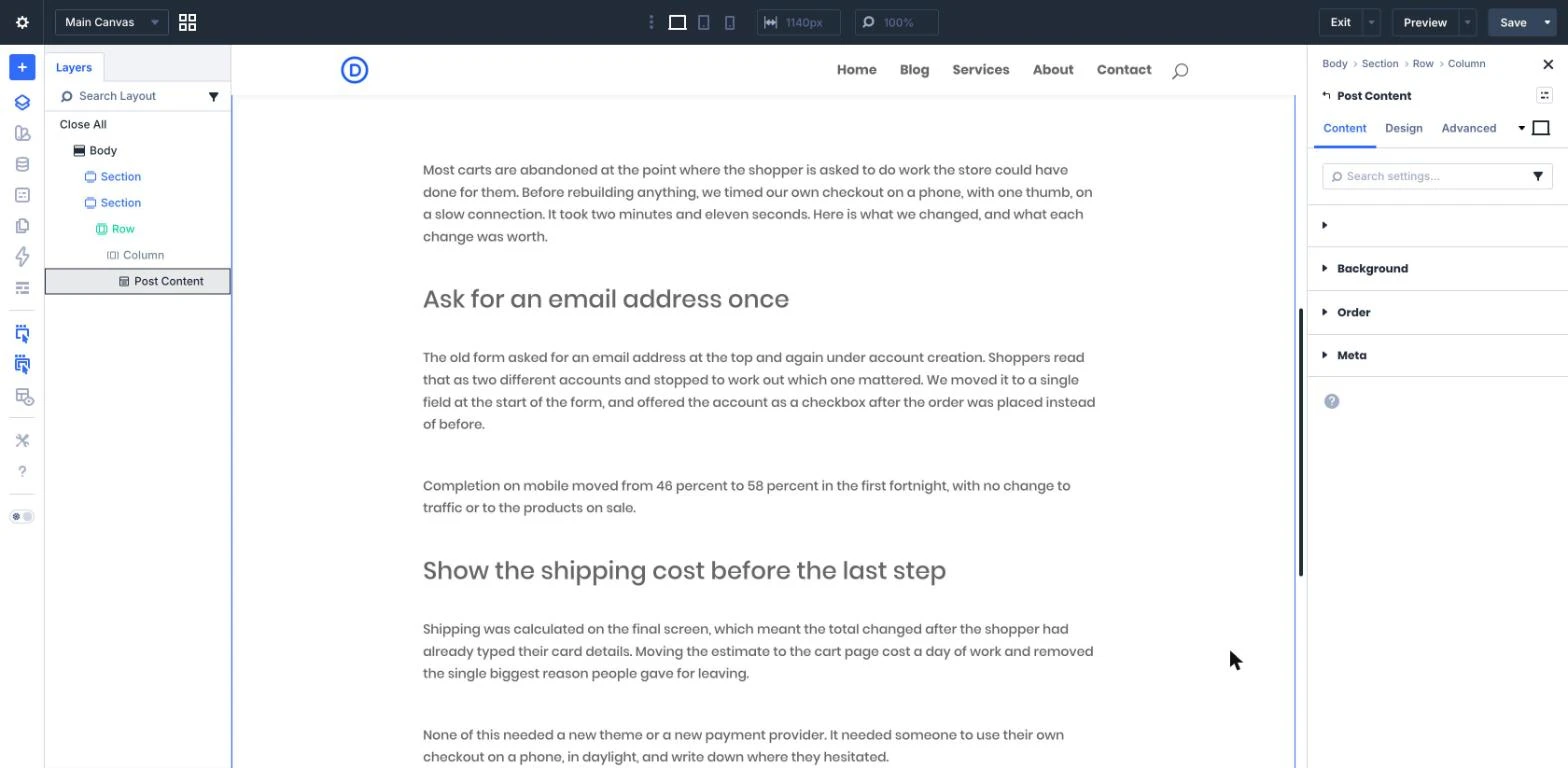
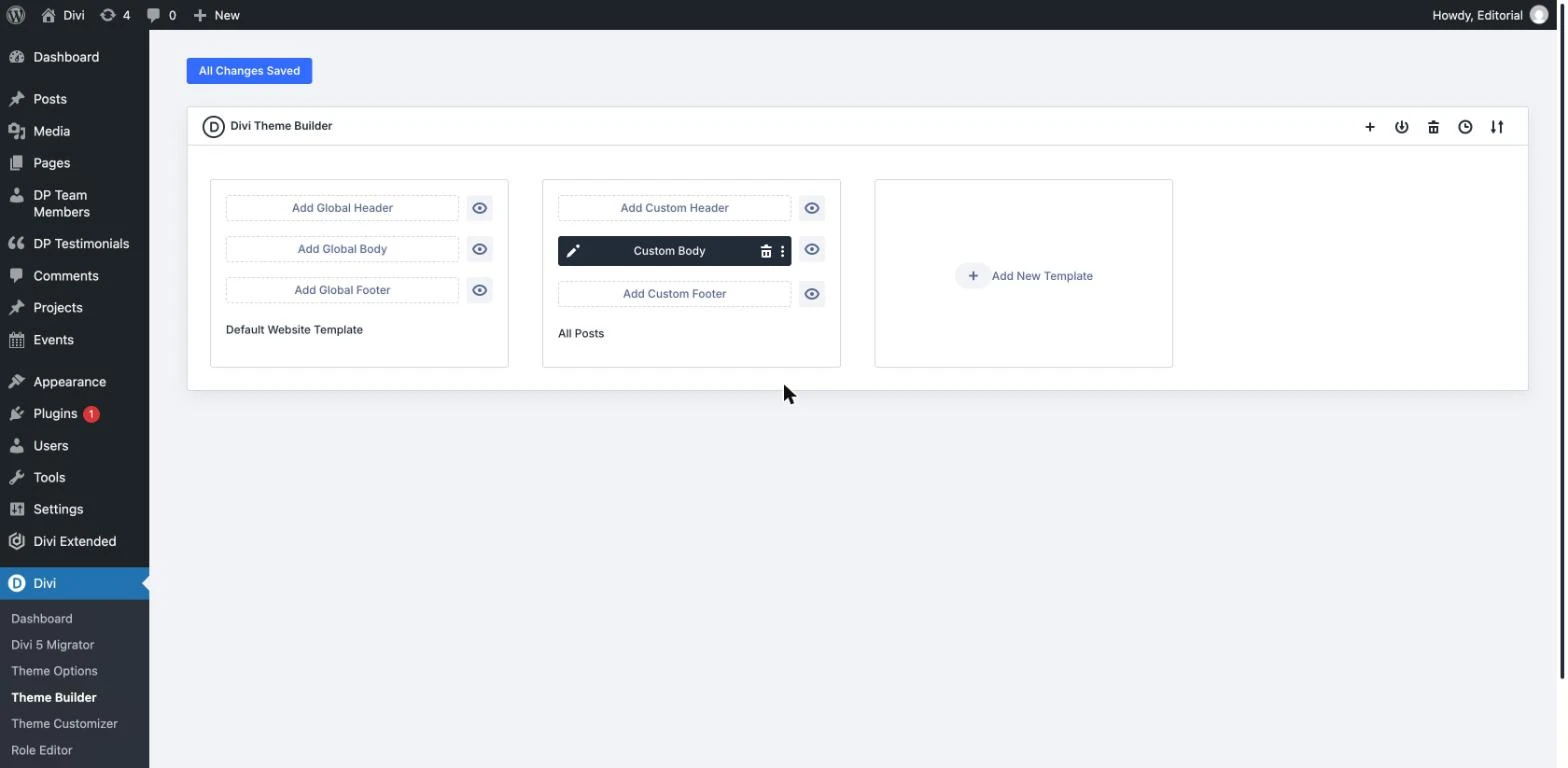
Check it first, before you blame anyone. Open Divi > Theme Builder, edit the body of the template assigned to All Posts, and click into the area where the article should be. The settings panel should name the module Post Content, with the breadcrumb Body > Section > Row > Column above it.
2. In Divi 5, the template is open inside the post
This is the cause most handover guides have not caught up with. In Divi 5, opening a post in the Visual Builder loads the Theme Builder layouts assigned to it: the header above the content, the footer below it, and the body template around it. All of them are live and editable on that one screen, which is deliberate and useful when you are the one building the site.
For a client, it means the site-wide template and the single post they were asked to write are on the same screen, in the same builder, behind the same Save button. One click in the wrong container, a few words typed, Save, and the change is on every post. Nothing warns them, because as far as Divi is concerned they edited the thing they clicked.
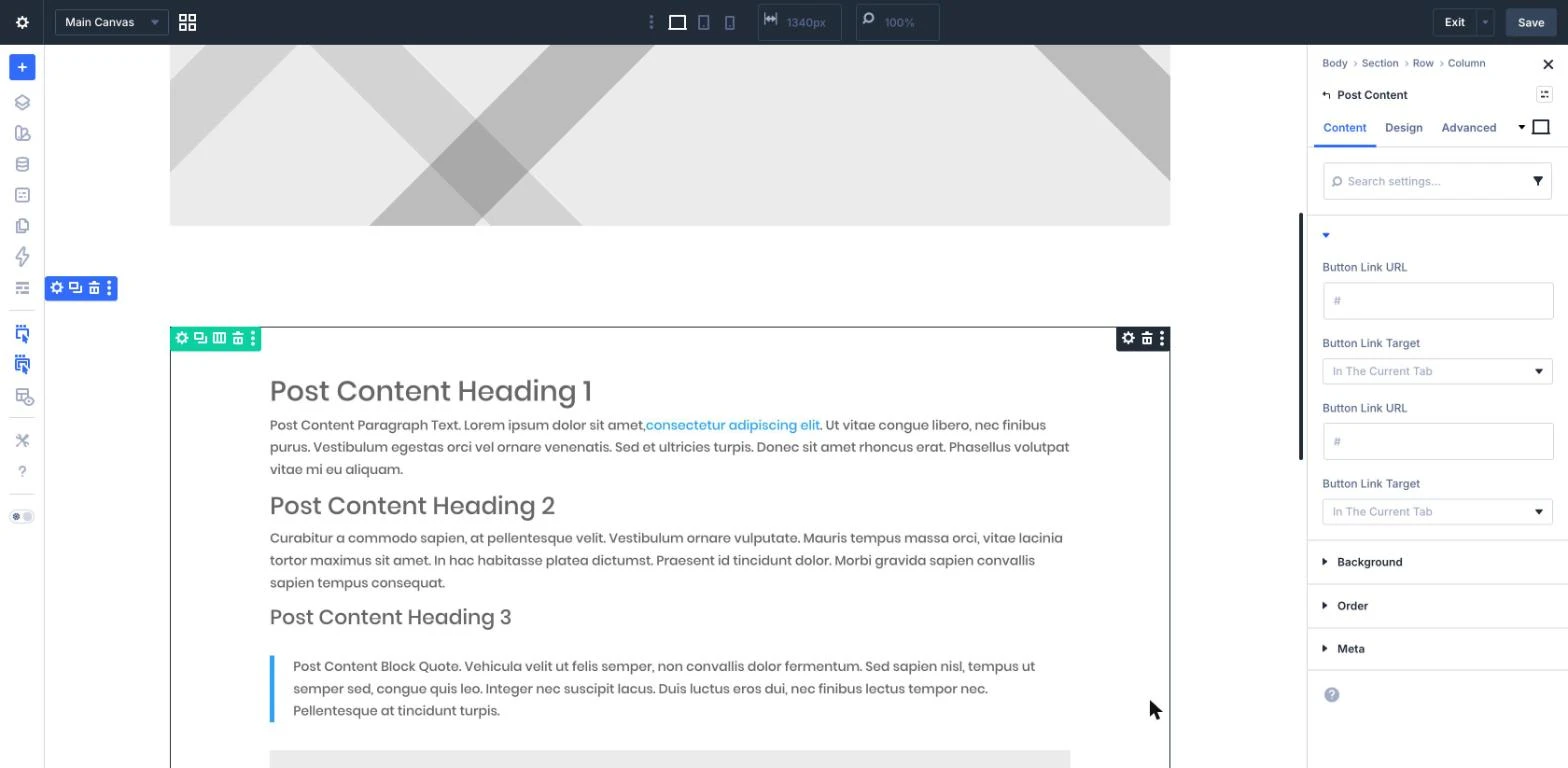
The screenshot below is a single blog post open in the builder, not the Theme Builder. The selected module is part of the template: the breadcrumb reads Body.
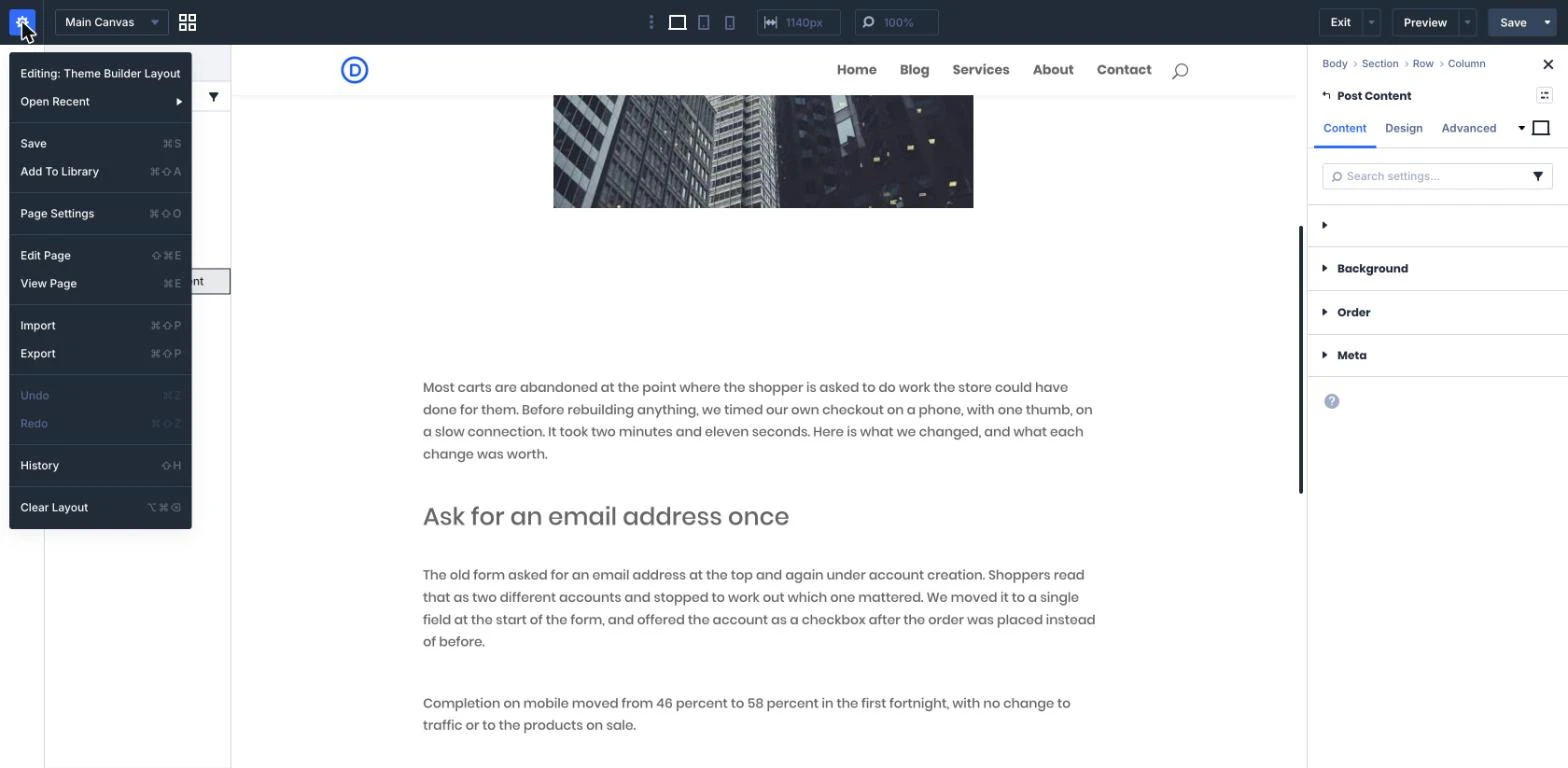
There is a second tell, and it is the one to teach anyone on your team who does keep builder access. Open the builder menu at the top left while a template element is selected and the first line reads “Editing: Theme Builder Layout”. If you see that line, whatever you save next lands on every post using that template.
3. The layout they edited was a global library item
If your blog posts are built from a Divi Library layout, it matters whether that layout is global. A global item is one stored layout referenced in many places, so editing it inside one post rewrites it everywhere it appears. A layout loaded from the library in the normal way is a copy, and edits to the copy stay in that post. Clients cannot tell the two apart by looking.
And the reason none of the guardrails fired: the client is an administrator
Divi’s Role Editor works per role, and Administrator has every option enabled by default. If the people breaking your templates are administrators, no amount of Role Editor work will stop them, because you are not restricting the role they are using.
It is worth being precise about why this matters so much, because it decides the whole setup. The Divi menu’s Theme Builder and Theme Options screens require the edit_theme_options capability, which the Editor role does not have. On a default install an Editor cannot open the Theme Builder at all. So a client who overwrote a template was almost certainly handed an administrator account.
Decide where the post design lives
Before changing settings, pick one of these three arrangements and commit to it. Most broken sites are broken because two of them are half in place.
| Where the design lives | What the client touches | Risk to manage |
|---|---|---|
| A Theme Builder body template for All Posts | The post editor only. The template styles their words | The template is editable from inside their post unless the role cannot reach it |
| No body template. A plugin controls the single post layout | The post editor only. The layout is a dropdown in Settings | You pick from the plugin’s layouts rather than drawing your own |
| The Divi Builder, per post | A full builder on every post | Highest. Every post is a fresh chance to break something, and there is no single template to fix |
For a blog that a client writes, the third row is the one to retire. The design should be decided once, by you, in a place their account cannot open. Everything below assumes that.
The client-safe setup
Step 1: hand over an Editor account, not an administrator account
Create the client a user with the Editor role, or a custom role built on Editor plus the specific extras they need, such as a forms plugin or the shop. Editor covers writing, editing and publishing posts and pages, which is the whole job for most clients, and it stops at the Theme Builder.
Do this first. Every restriction after it is applied per role, so an administrator account ignores all of them. If the client insists on administrator access for billing or plugin reasons, give them a second administrator login they keep for that, and ask them to write posts with the Editor account. It is a weaker position than a single restricted role, so say plainly which account is for which job.
Step 2: take the Divi Builder off posts
Go to Divi > Theme Options > Builder > Post Type Integration. The setting is called Enable Divi Builder On Post Types, with a toggle per post type. Turn Posts off and save. The client now writes in the standard block editor and the Theme Builder template does the design, which is the arrangement the Theme Builder was made for.
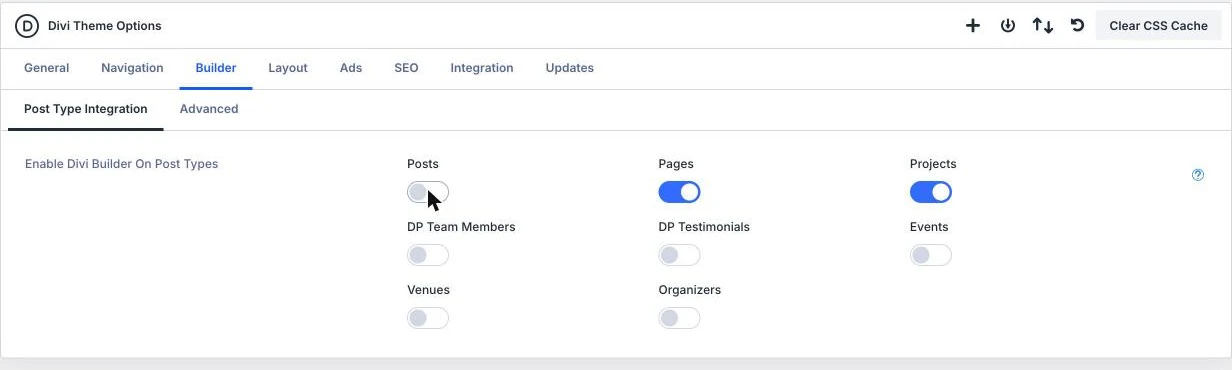
Two things you gain by writing posts in the block editor: every post keeps its own revisions in WordPress, so a bad edit to one article is a two-click restore, and there is no builder screen on which the template can be reached.
One caution. If existing posts were built with the Divi Builder, their content is stored as builder markup, so move those posts to editor content before you turn integration off, and test the change on a staging copy first.
Step 3: set the Role Editor for the role you are handing over
Go to Divi > Role Editor. There is a tab per role, changes to one role do not affect the others, and Save Divi Roles commits them.
Here is the part that is not in the guides. The Role Editor only offers a role the options that role could use anyway, so the General Functionality group is not the same on every tab. On the Administrator tab it holds Theme Options, Divi Library, Theme Builder, Support Center, Divi AI, Variables Manager, Split Testing, Divi Quick Sites, Theme Customizer, Page Options and Portability. On the Editor tab it holds four: Divi AI, Split Testing, Page Options and Portability. There is no Theme Builder switch to turn off for an Editor, because an Editor never had it.
So what you actually do depends on the role you handed over:
- Handing over an Editor. Turn off Portability under General Functionality, and under Library Settings turn off Edit Global Items and Save To Library. Leave Add From Library on if they need to load layouts: a loaded layout arrives as a copy, so changes stay in that post.
- Handing over a custom role that carries administrator capabilities. Now the Theme Builder switch does appear under General Functionality. Turn off Theme Builder, Theme Options and Portability there, plus the Library Settings options above.
Portability is worth a sentence of its own. It controls the import and export actions a role can perform, and an import is the fastest way to overwrite a set of templates in one action. A client who has been sent a layout file by someone else is the usual route in.
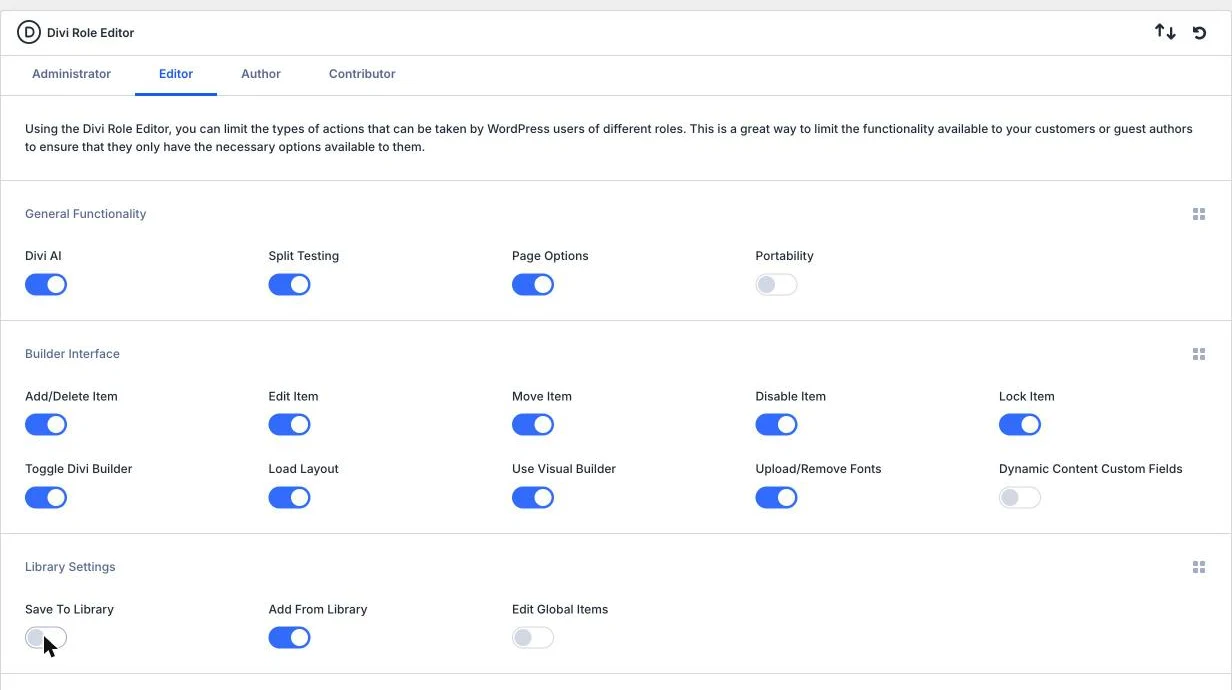
The same screen carries two more groups worth setting for a client: Builder Interface, where Add/Delete Item, Move Item and Lock Item decide how much they can rearrange, and Settings Tabs, where turning off Design and Advanced keeps them to content edits.
Step 4: make the template itself dynamic
Open the body of your All Posts template and give it a Post Content module where the article goes. Then look for anything in the template that holds real copy rather than dynamic content: a Text module with last month’s article in it, a hard-typed headline that should be the post title, a static featured image. Any of those will read as “every post is the same” even on a site no client has touched.
The rule to hold: a post template contains dynamic modules and design, and no words that belong to one article.
Step 5: keep a JSON export of every template
In Divi > Theme Builder, use the Portability icon to export all templates, or selected ones, as a JSON file, and keep that file somewhere of yours: the project folder, your repository, your own drive. Export again whenever you change a template. Recovery then costs one import instead of a database restore, and it is the one step in this list that helps on sites you have already handed over.
A note on hiding the template areas
Divi’s documentation describes a Show Theme Builder Layouts option in Builder Settings that hides the header, body and footer areas while you edit a post. On Divi 5.2.0 that option is not there. The Builder Settings panel holds Builder Default View Mode, History State Interval, Settings Modal Default Position, Page Creation Flow, Page Bar Icons and Show Disabled Modules At 50% Opacity, and nothing else. Check your own version before relying on it, and do not count it as a defense: the steps above do not depend on it.
Prove it before you hand over
Role restrictions are worth exactly what a test says they are worth, so the last step of every handover is to be the client for two minutes:
- Create a throwaway user with the client’s role.
- Open a private browser window and log in as that user.
- Check the Divi menu: Theme Builder and Theme Options should not be there.
- Open a blog post: there should be no option to edit it with the Divi Builder, only the block editor.
- Open a page in the Visual Builder, if that role keeps page access, and confirm the header and footer areas cannot be edited.
- Delete the test user.
Five minutes here is what turns a written guideline into a setup that does not depend on the client remembering it.
The other route: no post template to break
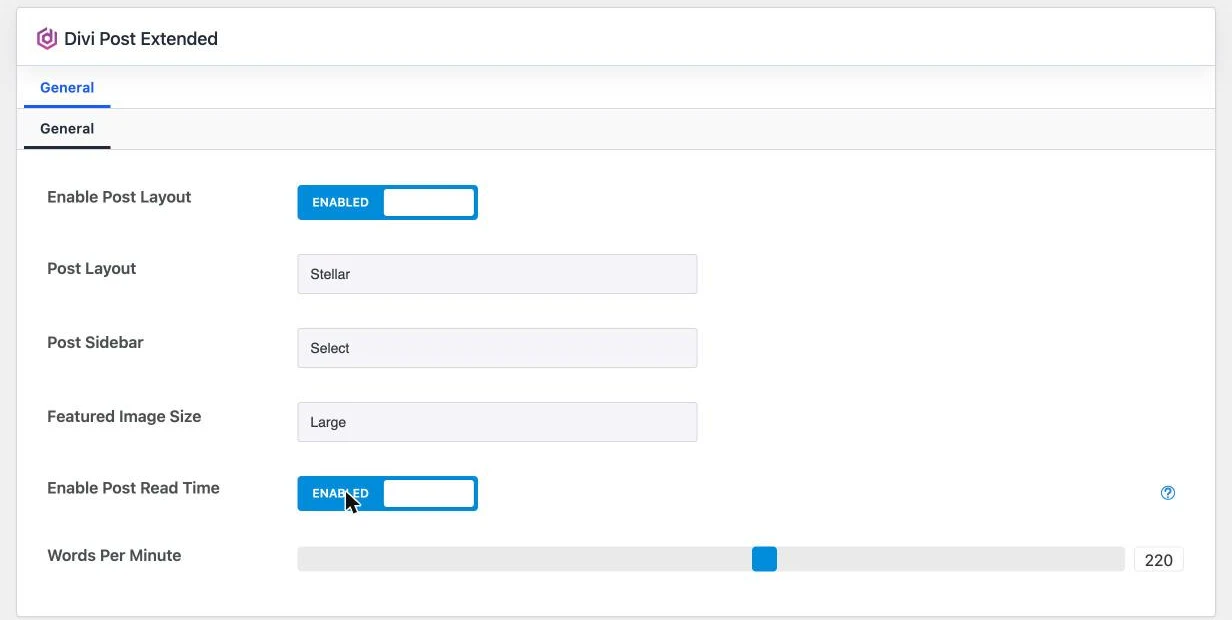
Everything above protects a Theme Builder template. The alternative is not to put the single post design in a template at all, and to run it from plugin settings instead. That is what Divi Post Extended does: it replaces Divi’s default single post layout with one of five designs, Stellar, Prime, Classic, Lush and Valiant, set once under Settings > Divi Post Extended.
What that changes for a client site:
- The design is a dropdown, not a layout. There is no template screen and no builder layout inside the post, so there is nothing to open, edit or overwrite. The worst a client can do is change which layout is selected, which you undo in one click.
- Nothing is copied into posts. It is not a library layout, so posts cannot drift apart from one another the way copied layouts do.
- Per post, where you want it. The plugin adds a Divi Post Extended box to the post editor with Post Layout and Post Sidebar, so one article can use a different layout, or a left, right or no sidebar, without a second template.
- The details clients ask for are built in. Read time from a Words Per Minute setting (50 to 350, 220 by default), gallery posts showing their images as a grid at the top, and a play button on audio and video posts.
- It works with Divi 5 and Divi 4, and costs $19 a year or $99 once for lifetime updates, on unlimited websites.
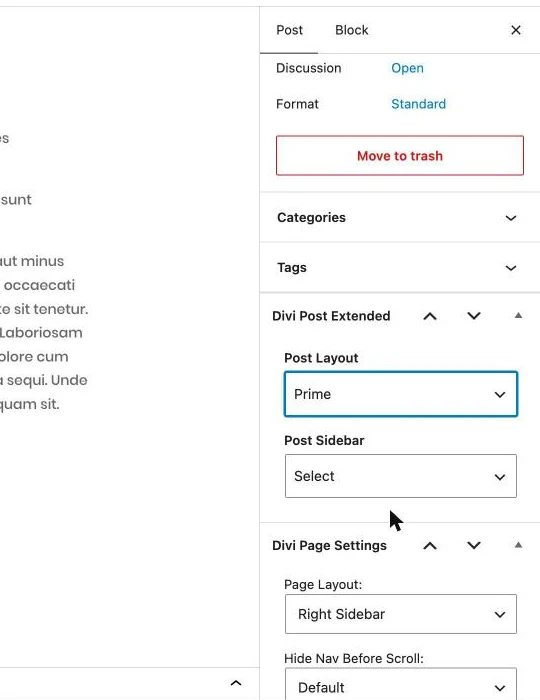
One thing to get right, because it decides whether this route works at all: a Theme Builder body template wins. If the All Posts template has a body assigned, that body renders and the plugin’s layout does not, whatever you choose in its settings. Pick one route per site. If you want the plugin to own the single post design, the All Posts template should carry a header and footer at most, with no body.
Getting a template back after it has been overwritten
In the order you should try them:
- The editing history, if you are still in the session. The builder keeps a log of actions you can step back through, but it resets when the session ends, so it only helps the person still on the screen.
- Your JSON export. Import it back through Portability in the Theme Builder. This is why step 5 exists.
- A template part revision. Elegant Themes’ help center points to a plugin, Divi Restore Theme Builder Templates, downloaded as a zip from its GitHub release. Under Divi > Restore TB Templates it adds three tabs: Templates for deleted templates, Template Parts for individual header, body and footer parts, and Revisions, which lists earlier revisions of an existing part. Select the part, click View Revisions, use Compare with current, then Restore This Revision. Back up the site before you start and remove the plugin once the layout is back.
- A database backup. The fallback when there is no export and no usable revision, which is also the argument for daily backups with a month of retention on any site a client can edit.
The handover checklist
Run this on every client site, old ones included. It takes about fifteen minutes per site.
- Client accounts are Editor, not Administrator.
- Divi > Theme Options > Builder > Post Type Integration: Posts turned off.
- Divi > Role Editor, client role: Portability off, Edit Global Items off, Save To Library off, and Theme Builder plus Theme Options off if that role is offered them. Saved with Save Divi Roles.
- The All Posts template body uses a Post Content module and holds no article copy.
- No blog layout is a global library item.
- A dated JSON export of all Theme Builder templates is stored outside the site.
- Daily database backups with at least thirty days of retention.
- Tested by logging in as a test user on the client’s role, then the test user deleted.
Guidelines and training are worth writing, but they are the layer that fails quietly. These eight lines are the layer that holds, because none of them depend on the client doing the right thing on a busy Tuesday.
Frequently asked questions
Why do all my Divi posts show the same content?
Because the body of the Theme Builder template assigned to those posts holds static content instead of a Post Content module, or because someone edited the template itself while they were editing a post. Check the template body for a Post Content module first, then check who has Theme Builder access.
Can Editors open the Divi Theme Builder?
Not on a default install. The Theme Builder and Theme Options screens need the edit_theme_options capability and the Editor role does not have it, which is also why the Divi Role Editor shows no Theme Builder switch on the Editor tab. If an Editor on your site can reach it, something has granted that role extra capabilities, usually a role plugin or a snippet.
Will the Role Editor restrict a client who is an administrator?
No. Restrictions apply to the role, and Administrator has every option enabled by default. Move the client to Editor first, then set that role.
Can I block the Theme Builder but keep the Divi Builder for pages?
Yes. A role without Theme Builder access can still edit page content in the Visual Builder. On a role that is offered the Theme Builder switch, turning it off leaves page editing intact.
Does turning the Divi Builder off for posts delete anything?
It changes which post types offer the builder, not your content. Posts whose content was built with the Divi Builder do need their content moved into the editor first, so test the change on a staging copy before doing it on a live blog.
Does the Divi Theme Builder keep revisions of a template?
There is an editing history inside the builder session, and it resets when the session ends. For anything older, use a JSON export taken with Portability, or the Revisions tab of the restore plugin that Elegant Themes’ help center links to.
Is it safe to let a client use a global library layout?
Treat it as unsafe. An edit to a global item changes it everywhere it is used. If a client needs to reuse a layout, give them a non-global one they load per post, which arrives as a copy.
Do blog posts need a Theme Builder template at all?
No. You can leave the single post layout to a plugin and keep the Theme Builder for headers, footers and archives. That removes the template a client could edit, which is why it suits sites where the client publishes often.
Pick the design once, in a place they cannot open
Clients are not going to stop clicking. The fix is a site where the wrong click has nowhere to land: an Editor account, no builder on posts, the library and portability options off, a dynamic template, and an export in your own folder. If you would rather have no post template to defend, Divi Post Extended moves the single post design into a settings page, with five layouts, sidebar control per post and read time built in, for $19 a year or $99 for lifetime updates on unlimited websites.
FAQs
Because the body of the Theme Builder template assigned to those posts holds static content instead of a Post Content module, or because someone edited the template itself while they were editing a post. Check the template body for a Post Content module first, then check who has Theme Builder access.
Not on a default install. The Theme Builder and Theme Options screens need the edit_theme_options capability and the Editor role does not have it, which is also why the Divi Role Editor shows no Theme Builder switch on the Editor tab. If an Editor on your site can reach it, something has granted that role extra capabilities, usually a role plugin or a snippet.
No. Restrictions apply to the role, and Administrator has every option enabled by default. Move the client to Editor first, then set that role.
Yes. A role without Theme Builder access can still edit page content in the Visual Builder. On a role that is offered the Theme Builder switch, turning it off leaves page editing intact.
It changes which post types offer the builder, not your content. Posts whose content was built with the Divi Builder do need their content moved into the editor first, so test the change on a staging copy before doing it on a live blog.
There is an editing history inside the builder session, and it resets when the session ends. For anything older, use a JSON export taken with Portability, or the Revisions tab of the restore plugin that Elegant Themes’ help center links to.
Treat it as unsafe. An edit to a global item changes it everywhere it is used. If a client needs to reuse a layout, give them a non-global one they load per post, which arrives as a copy.
No. You can leave the single post layout to a plugin and keep the Theme Builder for headers, footers and archives. That removes the template a client could edit, which is why it suits sites where the client publishes often.





0 Comments