
Is your online store not getting many visitors, and sales are slow? Revamp your Divi website with good Divi extensions.
There are around 10-25 million e-commerce sites on the internet worldwide. So, to compete with them, you need to level up your game in website design. Currently, the only way to stay in the race is by making your website more responsive, engaging, and updated.
So, if you are a Divi user, you can use multiple Divi extensions to make your online store stand out in 2026. For you, we have gathered the eight best Divi extensions that you need for your digital stores in 2026. Read till the very end to know more about them.
8 Best Divi Extensions for Digital Stores
1. Divi Plus Particles Background Extension
The more interactive your online store’s website is, the more it will keep the visitors engaged, increasing the time they spend on the website. One such interactive feature is the particle effect in the background.
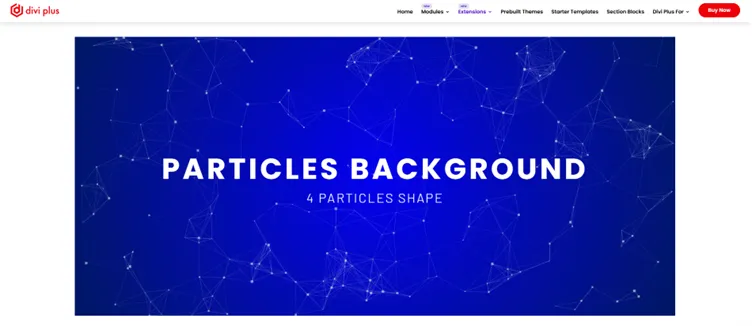
With the Divi Plus Particle Background extension, you can set different animated backgrounds using particle effects. It offers options for particle shape, speed, number, and density to make your background more visually appealing and attract your visitors.
If you have a tech & electronic store, a digital products store, a jewelry and luxury items store, this will look absolutely elegant.
To get your hands on Divi Plus extensions, you need to buy the subscription for $79 per year or $249 for a lifetime.
2. Divi Plus Element Schedular Extension
If you want to show or hide certain elements based on date and time, you can use the Divi Plus Element Scheduler extension. This extension lets you automatically show or hide sections, banners, or modules in Divi.
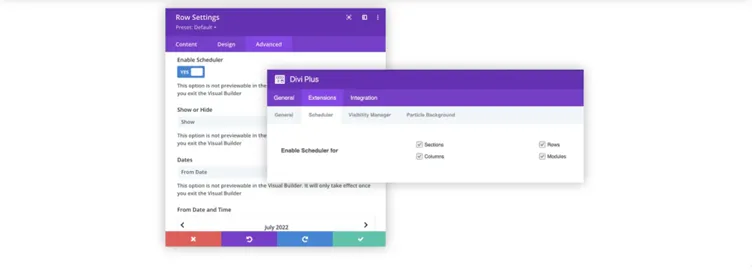
This is an excellent and must-have extension for sales and promotions setup, or even a new product line launch.
For example, you can display a promotional banner for an upcoming sale and set a date and time to hide it when the sale ends. This kind of automation helps you save a lot of free time to work on other technical aspects of your business.
Element Scheduler extension is perfect for all kinds of online stores, from a simple grocery store to a SAAS platform.
3. Divi Plus Visibility Manager Extension
Another extension that every digital store should include in its Divi site is a Visibility Manager extension, which allows you to control certain elements to appear or disappear based on user roles. This means you can control (show/hide) elements from All Users/ Logged-In/ Non-Logged Users.
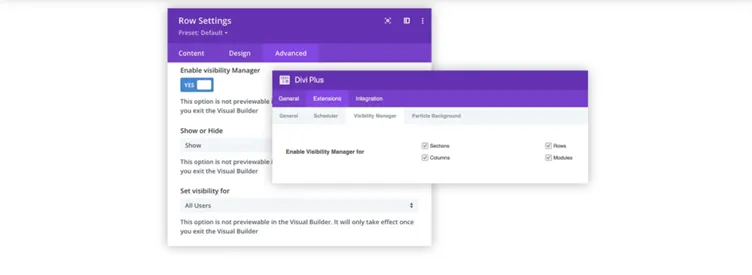
This looks quite technical, but in reality, it is simply a few intuitive tweaks that require no complex coding whatsoever.
Head to the Divi Builder → Advanced Settings → Visibility and turn on the Visibility Manager. Then choose whether you want to show or hide the element, and then pick the user type (All Users/ Logged-In/ Non-Logged).
If you own a digital store that sells online courses, subscriptions, or some sort of membership, this extension is for you. For example, you can show exclusive deals or bonus offers only to your logged-in users and hide them from All Users/Logged Out Users.
4. Divi Plus Unfold Extension
Did you know the website design influences 94% of customers’ first impression of a web page? So, a website design is something that can make or break your online business. Clean websites enhance user experience, so it is important to manage the website’s space creatively.
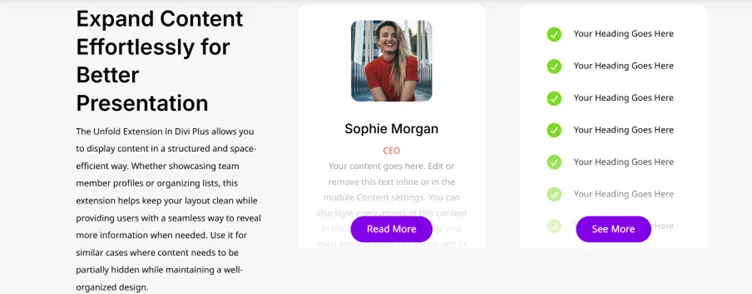
For this purpose, Divi Plus offers the Unfold extension, which is an incredible website space management tool. It lets you hide part of your website’s content and then reveal (unfold) it when a user clicks a button. It also allows you to set the color gradient and visible heights of your content so that your website appears more engaging.
For example, for testimonials or reviews, you can only show the short quotes and provide a button to reveal the long-form testimonials when the user clicks on the button given there.
This is perfect for displaying long-form previews, descriptions, testimonials, team members, and portfolios. You can use the Divi Plus Unfold extension for all sorts of business websites.
5. Divi Plus Library Shortcode
Divi Plus also offered an amazing Library Shortcode extension, which allows you to use the saved layouts in the Divi library. It creates a shortcode for the items in your Divi library that you can easily add to your website as needed.
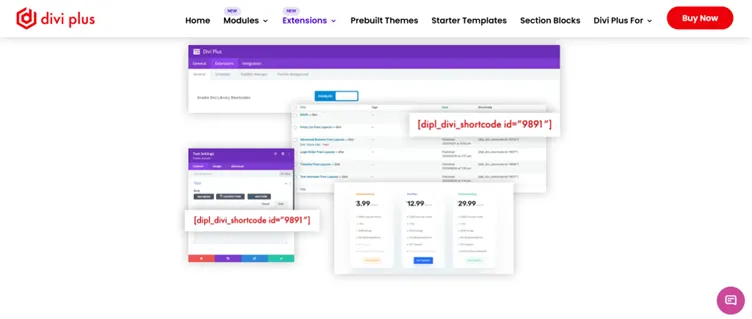
You can easily add Divi layouts in the form of copy-paste shortcodes to your posts, pages, sidebars, widget areas, etc. For example, let’s say we have designed a promotional banner in Divi and saved it in the Divi library.
Divi Plus provides you with a shortcode of this saved layout, which you can paste wherever you want a banner on your website.
This will automatically add the banner without any heavy work.
This extension not only helps you save your valuable time but also allows you to reuse the same design multiple times.
6. Checkout Manager Extension
Cart Abandonment is one of the major challenges in the online shopping industry. According to Statista, the cart abandonment rate globally is around 70%, which is pretty high. This is mainly due to a poor or lengthy checkout process and an unreasonably high shipping fee.
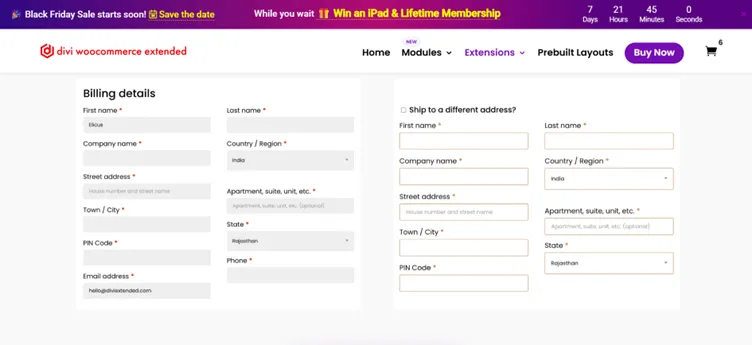
So, you need an easy and straightforward Checkout form. If you have a WooCommerce store, you can use the WooCommerce Checkout Manager extension for your store. It helps you to simplify the process of adding products to the cart to create a branded checkout experience.
This extension also lets you decide which fields to show. Moreover, it allows you to customize the field’s look with a layout option that allows you to modify the field’s width.
Checkout Manager is a handy extension for all online business owners who want to decrease the cart abandonment rate and increase sales.
7. Wishlist Manager Extension
Wishlist is a great way to engage your users and helps them navigate through your best items quickly. If you want to add a functional wishlist to your digital store, use this Wishlist Manager extension.
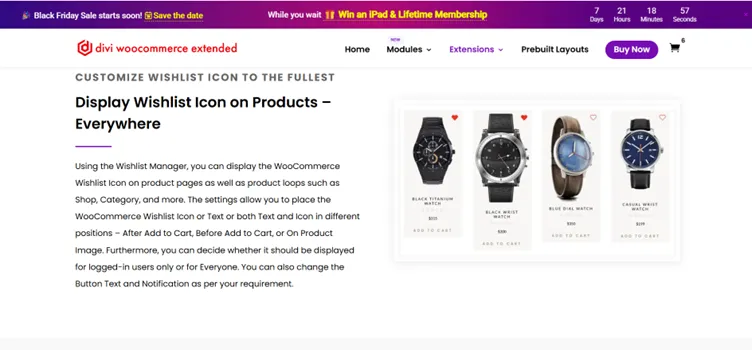
This extension allows you to add the Wishlist functionality to your Divi store by showing the wishlist icon. Using this icon, the visitors can add items to their wishlist and save them for later use. It also allows you to place this icon or text in different positions: After the add to cart page, before the add to cart page, or on the product image page.
Moreover, you can also control who can see this functionality (Logged-in or All users).
Wishlist Manager extension also comes with a module to design custom pages for Wishlisted products. You can set a limit on the number of products showcased, apply a masonry layout, change the number of columns up to 5, or display price and the Add to Cart button.
To keep the shopping experience seamless, this extension also allows you to remove the product from the Wishlist with a Second click. And lastly, it allows you to view all the Wishlisted products in a separate tab.
8. Tab Manager Extension
If you want users to spend more time on your website, you must make it easy to navigate. Use the Divi WooCommerce Tab Manager extension to display information in an organized way on your website.
It helps your users view all the necessary product details without scrolling long pages. All the information will be provided in compact tabs on the product pages efficiently.
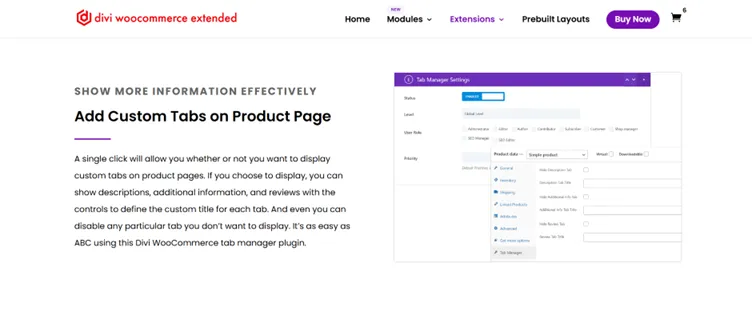
With a single click, you can show or hide custom tabs on the product pages. You can display descriptions, additional information, and reviews with the control to disable any tab that you don’t want to show.
This extension also helps you select where you want to display these tabs and on which product. You can choose from the three options that will have tabs: Global (all products), Category (products specific to the category), and Product (individual products).
FAQs
Yes, Divi is an excellent visual page builder with several handy modules and extensions that allow you to create a visually appealing and responsive website. Their easy-to-use nature allows you to add functionalities and items necessary for an e-commerce store easily. You can use Divi extensions to build a nice-looking and interactive online store that sells well.
There are multiple Divi extension providers on the internet providing effective Divi-related products. Divi Plus, Divi Flash, Divi Supreme, and Divi Next are some of the top picks for you. However, you can search for other options too if none of them suit your needs.
Using Divi extensions for your online store is important in so many ways:
– The extensions make the content of your website more intuitive and user-friendly, giving a feel that the design is tailored for the user specifically.
– They help you increase engagement (Unfold extension) and make your products cleaner (Wishlist and Tab Manager extension).
– These extensions also help you run date and time-focused elements on the website (Visibility Manager extension) and much more.
Final Thoughts
As of now, there are around 26 million e-commerce stores around the globe, which are expected to make $8.1 trillion by 2026. This shows how important it is to have a digital store that performs well.
So, as a Divi website owner, you have multiple options to utilize Divi-friendly extensions that can prove handy for your online store.
We have picked the top 8 Divi extensions that we think can boost your sales and revamp your digital store to effectively engage visitors. Using them creatively will lead you to increase your sales as well as build your trust among your audience.

0 Comments