
Search Divi Events Extended Documentation
Search for answers or browse our knowledge base.
Repeating events
How to make an event repeat, including the monthly repeat on a weekday added in version 1.2.0, such as the second Tuesday or the last Friday of every month. A repeating event is one event with many dates. Each date has its own URL, and its own places when the event takes bookings.
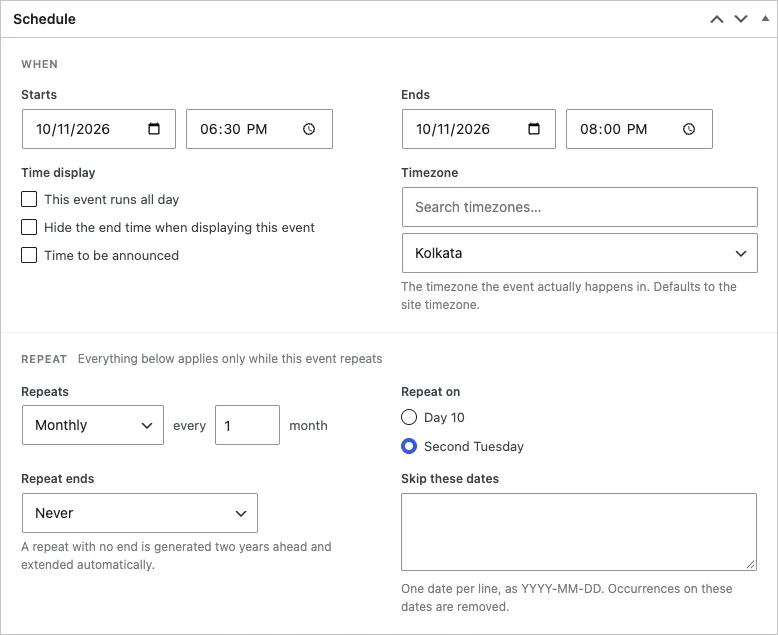
Make an event repeat
- Go to Events > All Events and edit the event.
- In the Schedule box, set the first date and time in Starts and Ends.
- Under Repeat, choose Daily, Weekly, Monthly or Yearly in Repeats, and how often (every 1 month, every 2 weeks and so on).
- In Repeat ends, choose Never, After a number of occurrences or On a date.
- Click Update.
Monthly on a weekday
When Repeats is Monthly, Repeat on gives a choice based on the start date:
- Day (number): the same day of the month, for example Day 10. Months with fewer days are skipped.
- (Second) (weekday): the same weekday in the same week of the month, for example Second Tuesday.
- Last (weekday): shown when the start date is in the last week of the month, for example Last Friday.
To repeat on a different weekday, change the start date first. For example, start the event on the second Tuesday of a month to get Second Tuesday.
Other repeat settings
- Repeat on (Weekly): the days of the week the event repeats on.
- Skip these dates: one date per line, as YYYY-MM-DD. The event doesn’t take place on these dates.
- Never: a repeat with no end is created two years ahead and extended on its own.
Each date has its own address. See Pretty URLs for repeating events.