
Search Divi Events Extended Documentation
Search for answers or browse our knowledge base.
Pretty URLs for repeating events
This page explains the URLs that Divi Events Extended gives each date of a repeating event, and where they are used. From version 1.1.0, every date of a repeating event has its own address, made of the event’s URL and the date. A link to one date now opens that date, with the right date, places left and booking form, instead of the next date.
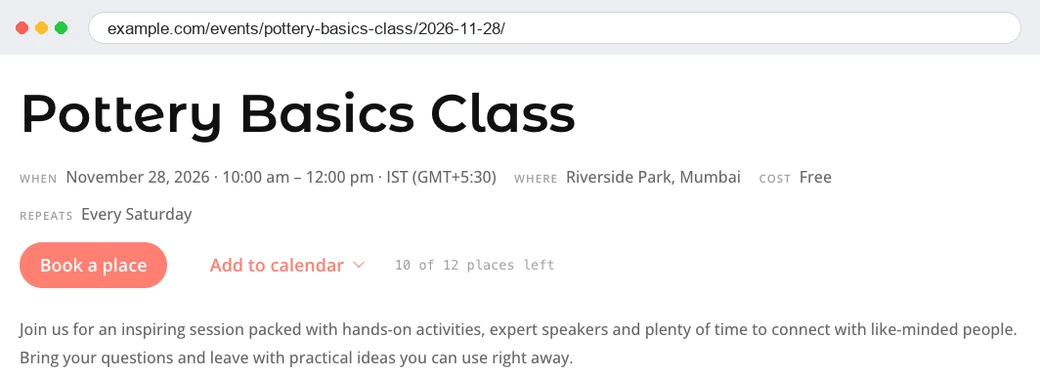
How the URLs look
- The event:
example.com/events/pottery-basics-class/opens the date nearest to now. - One date:
example.com/events/pottery-basics-class/2026-11-28/opens 28 November 2026. The date is written as year-month-day, in the event’s own timezone. - One date and time: when the event can start more than once on the same day, the start time is added, for example
/2026-11-28/10-00/.
An event that happens only once keeps its normal URL, because it has only one date.
Where the date URLs are used
- Links to repeating events in the Events feed, Events calendar and Related events modules.
- The previous and next event links on single event pages.
- Booking emails, so the link in the email opens the date that was booked.
The booking form on a date URL books that date only. See Bookings for free events.
Permalink settings
The date URLs need pretty permalinks. Go to Settings > Permalinks and choose any structure other than Plain. With Plain permalinks, the plugin still links to each date, but adds the date to the URL as a query string instead.
Note: The first part of the URL (events) comes from the event slug in Divi Extended > Divi Events Extended > URLs and Archives. Old links to the event keep working.