
Search Divi WooCommerce Extended Documentation
Search for answers or browse our knowledge base.
-
Getting Started
-
Modules
-
Extensions
-
Prebuilt Layouts
-
Developer Documentation
-
FAQs
- Responsive columns
- Remove add to cart text
- Mini cart in default Divi Header
- Mini Cart in custom Divi Header
- How to remove fading from out of stock product in DWE?
- How to display quickview and wishlist icons only on hover in DWE
- How to increase the size of search result box in DWE ajax search
- Menu items and category ordering/sorting
- How to align read more button in DWE Woo Product
- How to fix the "Add to Cart" button size changing on hover in WooCommerce?
All Topics
Print
Remove add to cart text
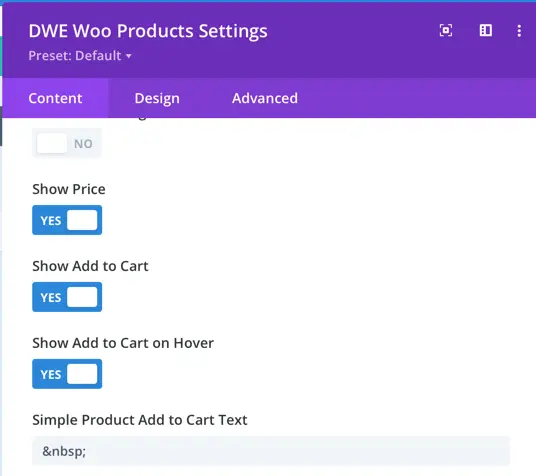
In Divi WooCommerce Extended, the default Add to Cart text can be changed to any other text. However, if you don’t want to show any text and use blank space for Add to Cart text, use the HTML code for non breaking space.
Was this article helpful?
0 out Of 5 Stars
| 5 Stars | 0% | |
| 4 Stars | 0% | |
| 3 Stars | 0% | |
| 2 Stars | 0% | |
| 1 Stars | 0% |
5
Table of Contents