
Search Divi Blog Extras Documentation
Search for answers or browse our knowledge base.
How to update child theme layout templates after plugin update
This guide shows you how to resolve layout or display issues (such as broken excerpts or missing elements) after updating plugins when using overridden layout templates in a child theme.
Why layout issues occur after plugin updates
When you customize a module layout by copying template files into your active Child Theme, WordPress loads your child theme’s file instead of the plugin’s default file. This allows you to safely customize layouts without losing changes during plugin updates.
However, when a major plugin update introduces new layout structures, updated functions, or modified data variables (such as excerpt length handling), your child theme’s older template file will continue to override the new plugin code. This version mismatch can cause visual glitches on your website, such as:
- Displaying raw numbers instead of actual post excerpts.
- Missing post metadata, categories, or featured images.
- Misaligned layout
How to identify and update overridden templates
Follow these steps to locate and update your child theme layout templates:
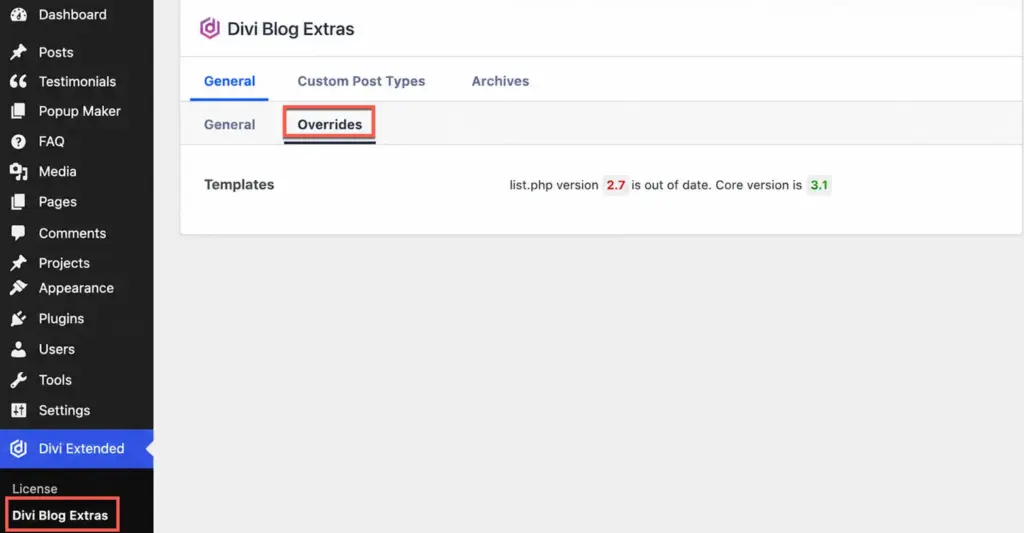
- Check Overridden Templates in Dashboard: Go to WP Dashboard > Divi Extended > Divi Blog Extras > General > Overrides. Here you will find a list of all layout templates currently overridden in your active child theme.
- Update Template in Child Theme: Access your website files via FTP or cPanel File Manager, open the listed template file in your child theme, and update it to match the latest template code from the updated plugin version (re-applying any custom code).
https://diviextended.com/documentation/divi-blog-extras/customize-layout-templates/ - Clear Cache & Test: Clear your browser cache and any active caching plugin caches, then refresh your webpage to verify that the layout renders correctly.
Frequently asked questions
Why doesn’t a plugin update automatically update my child theme files?
Child themes are designed to protect your custom code from being erased when plugins or main themes update. Because plugin updates only overwrite files inside the wp-content/plugins/ directory, any template files copied to your child theme must be synced manually when layout structures change.